


CUWB v5.1 Software updates are now available for the CUWB RTLS! Effective immediately, users can update their system to experience the new features, enhanced settings, and bug fixes in our updated CUWB Software Suite 5.1 release. Download the changelog for full details on new features, updates, and resolved issues.
The v5.1 Software Suite components can be downloaded from the Software Packages page.
Notification Page

Example of the new Notification Page in CUWB Manager
While using the CUWB system, notifications may appear in the CUWB Manager to alert users of errors, settings, and other issues. Previously, once the notification cleared, it was difficult to refer back to these notifications. In the new update, the notifications are now displayed and stored on the new notification page in CUWB Manager. Additional details on the new notification page can be found in the CUWB Manager Manual Status - Notifications section.
Improved Device Manager
The Device Manager in the CUWB Manager has been improved with bulk action support, new status reporting, and device attributes. Additional details can be found in the Device Manager Section of the CUWB Manager Manual.
Refined UWB Radio Frequency (RF) Power Control
Users can now reduce device transmission power or disable device LNAs, reducing the overall range between devices and improving performance in small areas with extreme multipath conditions. See the CUWB Manager Feature Reference for additional details.
Networking Wizard
A new Networking Wizard has been added to the system to improve user experience when configuring CUWBNets to operate on an isolated LAN. The wizard guides users through the specific Host PC configurations necessary to support the LAN setup. This allows users to quickly set up and deploy a new system without the complexity of working through complicated network settings.
Geofencer Example SDK
A common application for the CUWB RTLS includes triggering an action when a tag enters or exits a specific area. A CUWB System tracking athletes, for example, might send an API call to reduce the refresh rate of the tag when the player moves to the bench. A user might also choose to send a notification when an employee passes into an area designated as unsafe.
To demonstrate this feature, we created the Geofencer SDK, which walks users through some basic examples of geofencing. Written in Python and utilizing the CUWB API, the application can be expanded with extensions to change the color of the tag when it enters or leaves designated areas.
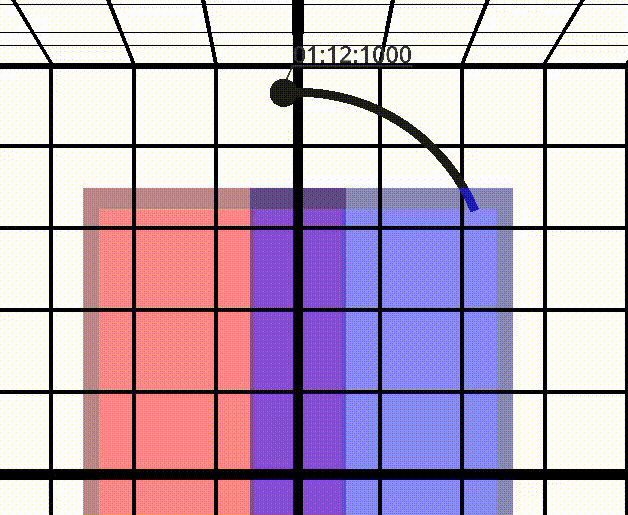
See the Tag change color as it passes through different zones with the Geofencer in CUWB Viewer
The Geofencer SDK is available for download on the Ciholas Github. For a guided tutorial, check out our application note: APD005 - Using Geofencing.
General CUWB System Updates and Improvements: